Rizful API
The Rizful API is Nostr Wallet Connect (NWC, NIP-47), the open standard for talking to Lightning wallets. There's no proprietary SDK and no API key: you copy a connection code from your Rizful vault and use it with any NWC library, including Alby's. Code you write for Rizful works with every other NWC wallet too.
- Protocol NIP-47 + NWC-02, 03, 05
- Transport Nostr relay (WebSocket)
- Encryption NIP-44 v2
- Amounts millisats
- Network Bitcoin mainnet
On this page
Overview #
Every Rizful vault can hand out NWC connection codes. A code is one string that holds everything your app needs:
which relay to connect to, which wallet to talk to, and the secret key your app signs and encrypts with. Your app
sends encrypted requests like make_invoice through the relay, and your vault answers.
There are two kinds of code, and this page is split the same way:
- Receive-only API: create invoices, watch them get paid, read balance and history. It can never spend.
- Send & receive API: everything above, plus
pay_invoice. It can spend from your vault, up to a budget.
| Relay | wss://relay-nwc.rizful.com/v1 |
| Authentication | The connection code itself. No API keys, no OAuth, no IP allowlists. |
| Encryption | NIP-44 v2. NIP-04 requests from older clients are still answered. |
| Amounts | Millisatoshis everywhere: 1 sat = 1,000 msats. |
| Times | Unix timestamps, in seconds. |
| Specs | NIP-47 core, plus the NWC extensions 02 Notifications, 03 Hold invoices and 05 Transaction history. |
Why our API is NWC #
We could have invented our own REST API. We didn't, on purpose. Because Rizful speaks a standard, you're never locked in to us.
Works with Alby and every NWC library
Use Alby's JS SDK, nwc-ruby, or any NIP-47 client. The same calls work against Rizful, Alby Hub and every other NWC wallet.
Switch wallets by changing one string
Moving to your own Alby Hub, or anywhere else, means swapping the connection code. No rewrite.
No webhooks, no open ports
Your server connects out to a relay. There's nothing to expose to the internet and no webhook signatures to check.
End-to-end encrypted
Requests and responses are encrypted between your app and your vault. The relay only sees ciphertext.
Scoped credentials
Give each app its own code. Receive-only codes can't spend; send codes carry a budget and an expiry. Delete one and only that app loses access.
Let users bring their own wallet
Since it's a standard, your app can accept any user's NWC code, from Rizful or any other NWC wallet, with the same code path.
Pick the right code #
Most integrations only need to get paid: checkouts, donation pages, paywalls, bots, invoicing. A receive-only code
does all of that and can never move money out of your vault, so a leaked server, log file or .env can't
drain your balance. Only reach for a send & receive code if your app really has to pay invoices.
Receive-only code
- Create invoices and hold invoices
- Check invoices and list transactions
- Read balance and connection info
payment_receivednotifications- Can never spend
Send & receive code
- Everything the receive-only code does
pay_invoiceandpayment_sent- Spending budget and expiry per code
- Can spend from your vault
| Receive-only | Send & receive | |
|---|---|---|
Create invoices (make_invoice) | Yes | Yes |
Check invoices (lookup_invoice, list_transactions) | Yes | Yes |
Balance and info (get_balance, get_info) | Yes | Yes |
Hold invoices (make_hold_invoice, settle, cancel) | Yes | Yes |
Notifications: payment_received, hold_invoice_accepted | Yes | Yes |
Pay invoices (pay_invoice) | No | Yes |
Notification: payment_sent | No | Yes |
| Can move money out of your vault | Never | Yes, up to its budget |
| Budget and expiry | Not needed | Default 250,000 sats every 30 days, expires in 3 years. Editable. |
| If the code leaks | Someone could see your balance and history and create invoices. Your money stays put. | Someone could spend up to the budget. Delete the code right away. |
A receive-only code can still read your balance and transaction history, so keep it private too. It just can't spend.
Quickstart #
Copy a receive-only code, put it in an environment variable on your server
(NWC_URI below), and use any NWC library. This example uses
Alby's JS SDK:
// npm install @getalby/sdk
import { NWCClient } from "@getalby/sdk/nwc";

// Your receive-only code. Keep it on the server; never ship it to the browser.
const client = new NWCClient({ nostrWalletConnectUrl: process.env.NWC_URI });

// 1. Create an invoice for 1,000 sats. Amounts are in millisats.
const tx = await client.makeInvoice({
  amount: 1_000_000,
  description: "Order #1234",
  expiry: 3600,
});
console.log(tx.invoice); // show this to the payer, e.g. as a QR code

// 2. Hear about it the moment it's paid.
const unsubscribe = await client.subscribeNotifications((n) => {
  if (n.notification.payment_hash === tx.payment_hash) {
    console.log("Paid at", n.notification.settled_at);
  }
}, ["payment_received"]);

// 3. Keep a batched list_transactions poll as the safety net (next section).
Want to poke at your code first? Paste it into the NWC Tester, which runs entirely in your browser.
Watching for payments #
list_transactions, not lookup_invoice per invoice
If a checkout polls lookup_invoice once per open invoice, a few dozen shoppers at once means hundreds of
requests a minute. That overwhelms your server and ours, and you'll hit rate limits. Instead, run one
poller for your whole app that makes a single list_transactions call every 3 to 4 seconds and checks it
against all your open invoices at once.
This is how OpenReceive is built. Even if you don't use OpenReceive, we recommend you copy its behavior:
- One poller, not one per invoice, request or browser tab. OpenReceive holds a gate in its database so every worker shares one wallet scan at most every 3 seconds.
- One window for everything open. Set
fromto the oldest open invoice'screated_atminus a minute, page withlimit20 andoffset, and match eachpayment_hashagainst your open invoices. - Only poll while something is open, and slow down as invoices age. OpenReceive scans every 3 seconds for invoices under 2 minutes old, every 6 seconds up to 5 minutes, then every 12 seconds.
- Notifications first, polling as the safety net. Subscribe to
payment_receivedfor instant updates; the poll catches anything missed while your relay connection was down.
// Open invoices: payment_hash -> { createdAt, orderId }
const open = new Map();

async function pollOnce() {
  if (open.size === 0) return; // nothing to watch, no request
  const from = Math.min(...[...open.values()].map((o) => o.createdAt)) - 60;
  for (let offset = 0; ; offset += 20) {
    // Settled payments only (unpaid defaults to false), newest first
    const { transactions } = await client.listTransactions({ from, type: "incoming", limit: 20, offset });
    for (const tx of transactions) {
      const order = open.get(tx.payment_hash);
      if (order && tx.state === "settled") {
        open.delete(tx.payment_hash);
        await markOrderPaid(order.orderId, tx); // your code
      }
    }
    if (transactions.length < 20) break;
  }
}

let running = false;
setInterval(async () => {
  if (running) return; // never overlap passes
  running = true;
  try { await pollOnce(); } catch (err) { console.error(err); } finally { running = false; }
}, 3500);
The real thing, with the shared gate, paging budget and age-based intervals:
reconcile-gate.ts and
payment-scan.ts
in the OpenReceive source.
Limits & fair use #
We don't publish exact rate limits
For security reasons, the exact numbers aren't public. They're generous for normal use. Go over and you get RATE_LIMITED: back off for a few seconds and retry.
No payment-size or liquidity limits
There are no particular limits on payment size, and no inbound-liquidity limits. You don't open channels or buy inbound capacity to receive.
Creating invoices is fine. Creating lots of invoices that never get paid is not: a reasonably high percentage of the invoices you create should actually be paid. A pattern of mostly unpaid invoices looks like abuse and can trigger limits on your account.
- Create an invoice when someone is ready to pay (they open checkout or tap Pay), not on every page view and not in bulk ahead of time.
- Reuse the still-valid invoice for the same order instead of making a new one on every refresh or retry.
Other limits are part of the protocol and safe to rely on:
| What | Rule |
|---|---|
| Polling | Watch open invoices with one batched list_transactions call every 3 to 4 seconds, not lookup_invoice per invoice. See Watching for payments. |
make_invoice expiry | 5 minutes to 24 hours (default 24 hours). |
list_transactions page size | 10 to 50 (default 25). Pages of 20 are a good choice. |
| Request freshness | pay_invoice requests older than 10 minutes, other requests older than 12 hours, and requests dated more than 2 minutes in the future are rejected with INVALID_REQUEST. An expiration tag is honored. |
| Metadata | Dropped if its JSON is over 4,096 characters (NWC-06). |
| Notifications | Each incoming payment notifies up to 10 of the vault's codes. |
Receive-only API
Create invoices and watch them get paid. Can never spend. Use it for checkouts, donation pages, paywalls, invoicing and bots. This is the code we recommend for almost everyone.
Get your receive-only code #
Every vault has one ready. It takes two taps in the Rizful app:
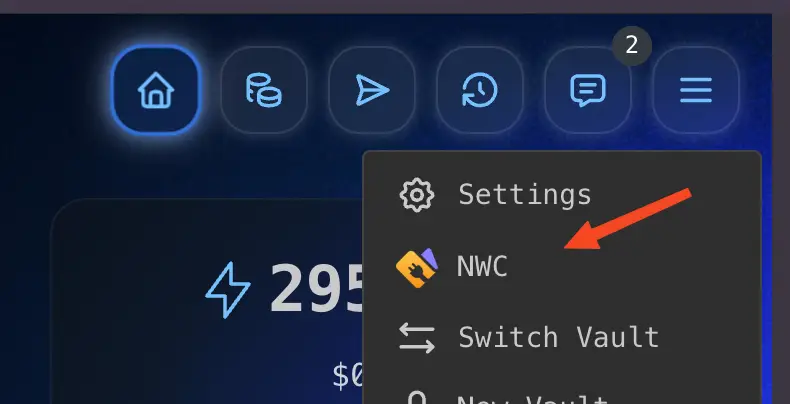
NWC_URI.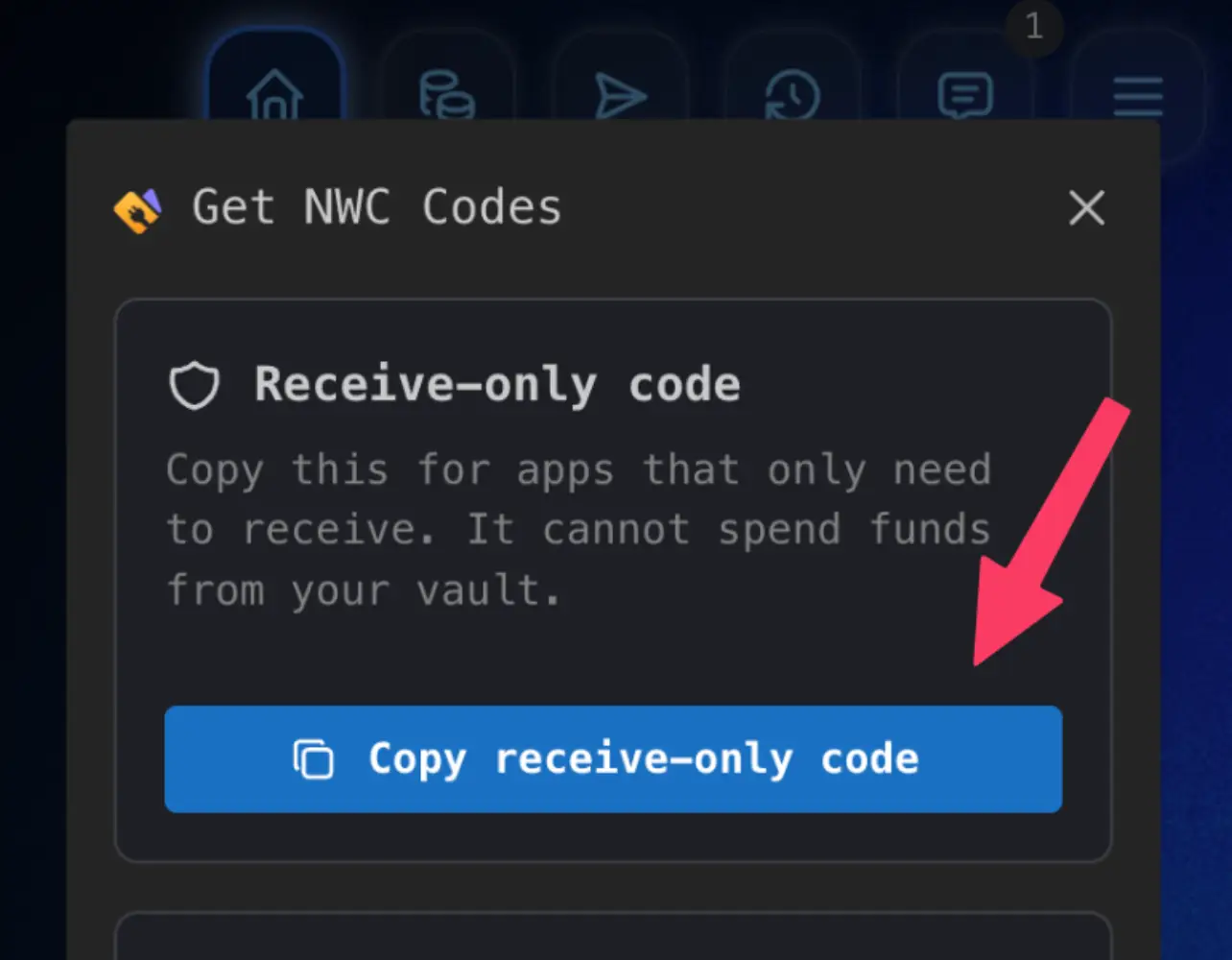
Each vault has its own code. To keep test traffic away from your main balance, make a separate vault for testing and use its code.

OpenReceive is a free, open-source library that wraps make_invoice, batched
list_transactions and payment_received into a ready-made checkout. This receive-only code is
the only credential it needs.
Describes the connection: which methods and notifications this code may use, the network, and the vault's Lightning Address. Call it once at startup to confirm you were given the code you expected (OpenReceive, for example, refuses to start with a code that can pay).
Parameters
None. Send "params": {}.
{
  "method": "get_info",
  "params": {}
}{
"result_type": "get_info",
"result": {
"alias": "Megalithic.me",
"color": "#000000",
"pubkey": "0322d0e43b3d92d30ed187f4e101a9a9605c3ee5fc9721e6dac3ce3d7732fbb13e",
"network": "mainnet",
"block_height": 974312,
"block_hash": "00000000000000000007543c6c9883fb5fed3be17f58dff2fa064437f7f3fce3",
"methods": [
"get_balance",
"get_info",
"list_transactions",
"lookup_invoice",
"make_invoice",
"make_hold_invoice",
"settle_hold_invoice",
"cancel_hold_invoice"
],
"notifications": [
"payment_received",
"hold_invoice_accepted"
],
"extensions": [
"02",
"03",
"05"
],
"lud16": "[email protected]"
},
"error": null
}Alby JS SDK: await client.getInfo()
Errors
| Code | When |
|---|---|
RATE_LIMITED | Too many requests. Back off for a few seconds, then retry. See Limits. |
extensions lists the optional NWC specs the code supports: 02 notifications, 03 hold
invoices and 05 transaction history. The example is a receive-only code. A send & receive code also lists
pay_invoice in methods and payment_sent in notifications.
The vault's spendable balance, in millisats.
Parameters
None. Send "params": {}.
{
  "method": "get_balance",
  "params": {}
}{
"result_type": "get_balance",
"result": {
"balance": 2950000000
},
"error": null
}Alby JS SDK: await client.getBalance()
Errors
| Code | When |
|---|---|
RATE_LIMITED | Too many requests. Back off for a few seconds, then retry. See Limits. |
Creates a BOLT11 invoice that pays into the vault. Show invoice to the payer (usually as a QR code)
and keep payment_hash to recognize the payment later. Receiving is free.
Parameters
| Name | Type | Description | |
|---|---|---|---|
amount |
integer | Required | Amount in millisats. 1,000 sats is 1000000. |
description |
string | Optional | Shown to the payer in their wallet, e.g. Order #1234. |
description_hash |
string | Optional | Hex SHA-256 of a longer description (used by LNURL and zaps). Send this or description. |
expiry |
integer | Optional | Seconds until the invoice expires. Default 86400 (24 hours); values are kept between 300 and 86400. |
{
  "method": "make_invoice",
  "params": {
    "amount": 1000000,
    "description": "Order #1234",
    "expiry": 3600
  }
}{
"result_type": "make_invoice",
"result": {
"type": "incoming",
"state": "pending",
"invoice": "lnbc10u1p5...",
"description": "Order #1234",
"description_hash": "",
"payment_hash": "d38564c2585d6fbbba4f5e3ba06fd2e80dbbb88c980a3dcbf94a616998022f5d",
"amount": 1000000,
"fees_paid": 0,
"created_at": 1794063845,
"expires_at": 1794067445,
"metadata": {}
},
"error": null
}Alby JS SDK: await client.makeInvoice({ amount, description, expiry })
Errors
| Code | When |
|---|---|
OTHER | Could not make invoice. Safe to retry. |
RATE_LIMITED | Too many requests. Back off for a few seconds, then retry. See Limits. |
Make an invoice when someone is ready to pay, and keep most of them paid: see
Limits & fair use. The metadata parameter from the spec is accepted but not stored.
Fetches one invoice this vault received, by payment hash or by the invoice string. state is
pending, settled or expired (hold invoices can also be accepted
or failed). Once settled, the response includes preimage and settled_at.
Parameters
| Name | Type | Description | |
|---|---|---|---|
payment_hash |
string | One of | Hex payment hash from make_invoice. |
invoice |
string | One of | The BOLT11 invoice string. |
{
  "method": "lookup_invoice",
  "params": {
    "payment_hash": "d38564c2585d6fbbba4f5e3ba06fd2e80dbbb88c980a3dcbf94a616998022f5d"
  }
}{
"result_type": "lookup_invoice",
"result": {
"type": "incoming",
"state": "settled",
"invoice": "lnbc10u1p5...",
"description": "Order #1234",
"preimage": "1c5ecb76d8e1e87351d7a8002559182546fe4c2cee533b95aed9a73d2168abf0",
"payment_hash": "d38564c2585d6fbbba4f5e3ba06fd2e80dbbb88c980a3dcbf94a616998022f5d",
"amount": 1000000,
"fees_paid": 0,
"created_at": 1794063845,
"expires_at": 1794067445,
"settled_at": 1794063887,
"metadata": {}
},
"error": null
}Alby JS SDK: await client.lookupInvoice({ payment_hash })
Errors
| Code | When |
|---|---|
NOT_FOUND | No invoice with that hash in this vault, or neither parameter was sent. |
RATE_LIMITED | Too many requests. Back off for a few seconds, then retry. See Limits. |
lookup_invoice is for a one-off check, like a customer saying "I paid". To watch many open invoices,
use one batched list_transactions call every few seconds instead.
See Watching for payments.
It finds incoming invoices only. For payments you sent, use list_transactions with
"type": "outgoing".
Lists the vault's invoices and payments, newest first. It covers the whole vault: payments to your Lightning Address, invoices made by other apps, and the web app. This is the method to use for watching many invoices at once.
Parameters
| Name | Type | Description | |
|---|---|---|---|
from |
integer | Optional | Unix time in seconds, inclusive. Default 0. |
until |
integer | Optional | Unix time in seconds, inclusive. Default now. |
limit |
integer | Optional | Page size. Default 25; kept between 10 and 50. |
offset |
integer | Optional | Number of transactions to skip, for paging. Default 0. |
unpaid |
boolean | Optional | Also include unpaid invoices and pending or failed payments. Default false (settled only). |
type |
string | Optional | incoming or outgoing. Leave it out for both. |
{
  "method": "list_transactions",
  "params": {
    "from": 1794060245,
    "limit": 20,
    "type": "incoming"
  }
}{
"result_type": "list_transactions",
"result": {
"transactions": [
{
"type": "incoming",
"state": "settled",
"invoice": "lnbc10u1p5...",
"description": "Order #1234",
"preimage": "1c5ecb76d8e1e87351d7a8002559182546fe4c2cee533b95aed9a73d2168abf0",
"payment_hash": "d38564c2585d6fbbba4f5e3ba06fd2e80dbbb88c980a3dcbf94a616998022f5d",
"amount": 1000000,
"fees_paid": 0,
"created_at": 1794063845,
"expires_at": 1794067445,
"settled_at": 1794063887,
"metadata": {}
},
{
"type": "outgoing",
"state": "settled",
"invoice": "lnbc25u1p5...",
"description": "Coffee",
"preimage": "836bb72c89952c36c4579e98f3c300d744c54f1a2a8f4a5f7834f9e07792bc68",
"payment_hash": "e122e43020af76cd1199b0ad122d6fb6d5a0b02f4225df8e86153832efe5ac22",
"amount": 2500000,
"fees_paid": 3000,
"created_at": 1794062945,
"settled_at": 1794062946,
"metadata": {}
}
]
},
"error": null
}Alby JS SDK: await client.listTransactions({ from, until, limit, offset, unpaid, type })
Errors
| Code | When |
|---|---|
OTHER | Invalid list_transactions params: ... says which parameter is wrong. |
RATE_LIMITED | Too many requests. Back off for a few seconds, then retry. See Limits. |
Time filters apply to created_at. Each object is a transaction object;
zap payments carry the zap request in metadata.nostr. total_count is not returned: page until
you get fewer results than limit.
Creates a hold invoice: when the payer pays, the funds are held, not settled, until you decide. You generate a random 32-byte preimage and send only its SHA-256 hash; Rizful never sees the preimage until you settle. Useful for escrow, marketplaces and "only charge if it ships" flows.
- Generate a preimage and hash it.
- Call
make_hold_invoicewith the hash and show the invoice to the payer. - Wait for the
hold_invoice_acceptednotification (or seestate: "accepted"inlookup_invoice). - Call
settle_hold_invoicewith the preimage to take the money, orcancel_hold_invoiceto refund the payer.
Parameters
| Name | Type | Description | |
|---|---|---|---|
amount |
integer | Required | Amount in millisats. At least 1,000 sats (1000000). |
payment_hash |
string | Required | SHA-256 of your preimage: 64 lowercase hex characters. Must be unique. |
description |
string | Optional | Shown to the payer. Up to 639 bytes. |
description_hash |
string | Optional | Hex SHA-256 of a longer description, instead of description. |
expiry |
integer | Optional | Seconds the payer has to pay. Default 24 hours; kept between 5 minutes and 24 hours. It does not set how long a payment can be held: see settle_deadline. |
min_cltv_expiry_delta |
integer | Optional | Final-hop CLTV delta. Default 144; kept between 144 and 288. |
metadata |
object | Optional | Your own data, returned on the invoice and in the notification. Dropped if its JSON is over 4,096 characters. |
{
  "method": "make_hold_invoice",
  "params": {
    "amount": 5000000,
    "payment_hash": "fa962fa6ccbada44cf73e4bd3a4b487954a521173727faf8921d91a95ef82b60",
    "description": "Escrow for trade #88",
    "expiry": 3600
  }
}{
"result_type": "make_hold_invoice",
"result": {
"type": "incoming",
"state": "pending",
"invoice": "lnbc50u1p5...",
"description": "Escrow for trade #88",
"description_hash": "",
"preimage": "",
"payment_hash": "fa962fa6ccbada44cf73e4bd3a4b487954a521173727faf8921d91a95ef82b60",
"amount": 5000000,
"fees_paid": 0,
"created_at": 1794063845,
"expires_at": 1794067445,
"metadata": {}
},
"error": null
}Errors
| Code | When |
|---|---|
BAD_REQUEST | A required parameter is missing or malformed (the message says which). |
OTHER | Hold invoices aren't available on this account, the amount is too small, the payment_hash already exists, or too many hold invoices are open. The message says why. |
INTERNAL | Could not create the hold invoice. Retry with the same hash. |
RATE_LIMITED | Too many requests. Back off for a few seconds, then retry. See Limits. |
Held payments lock up liquidity along the payer's route. Settle or cancel soon after
hold_invoice_accepted. If you do neither before the decision deadline (by default 2 hours after the
payment is held, sent as metadata.rizful_decision_deadline), Rizful cancels it and the payer is refunded.
Only a few hold invoices can be open per account at a time.
Takes a held payment by revealing the preimage. Any code for the same vault can settle, because the preimage is the proof. Settling an invoice that is already settled succeeds again.
Parameters
| Name | Type | Description | |
|---|---|---|---|
preimage |
string | Required | Your 32-byte preimage, 64 hex characters. |
{
  "method": "settle_hold_invoice",
  "params": {
    "preimage": "09f6027639f96710715ccee16202b68b1320bc51f5408fb95cec727d5c45ae65"
  }
}{
"result_type": "settle_hold_invoice",
"result": {},
"error": null
}Errors
| Code | When |
|---|---|
BAD_REQUEST | The preimage isn't 64 hex characters. |
NOT_FOUND | No hold invoice in this vault matches the preimage. |
OTHER | Payment not yet accepted, or the hold invoice was already canceled. |
INTERNAL | Settlement pending; check lookup_invoice. Rizful keeps retrying the settle; watch for state: "settled". |
RATE_LIMITED | Too many requests. Back off for a few seconds, then retry. See Limits. |
Cancels a hold invoice and refunds the payer if they already paid. Only the code that created the hold invoice can cancel it, so one app can't refund another app's escrow. Canceling twice succeeds again.
Parameters
| Name | Type | Description | |
|---|---|---|---|
payment_hash |
string | Required | The hold invoice's payment hash. |
{
  "method": "cancel_hold_invoice",
  "params": {
    "payment_hash": "fa962fa6ccbada44cf73e4bd3a4b487954a521173727faf8921d91a95ef82b60"
  }
}{
"result_type": "cancel_hold_invoice",
"result": {},
"error": null
}Errors
| Code | When |
|---|---|
BAD_REQUEST | The payment hash isn't 64 hex characters. |
NOT_FOUND | No hold invoice with that hash was created by this code. |
OTHER | Already settled or Settlement in progress. |
INTERNAL | Cancellation pending; check lookup_invoice. |
RATE_LIMITED | Too many requests. Back off for a few seconds, then retry. See Limits. |
Sent the moment any payment into the vault settles: your invoices, other apps' invoices, Lightning Address
payments and zaps. Match payment_hash against your open invoices. It goes to up to 10 of the vault's
codes (the one that made the invoice, plus the 9 newest).
Delivered as kind 23197, NIP-44 encrypted. Notifications ride on a live relay connection, so one can be
missed if your connection drops: keep a batched poll as the safety net.
{
  "notification_type": "payment_received",
  "notification": {
    "type": "incoming",
    "state": "settled",
    "invoice": "lnbc10u1p5...",
    "description": "Order #1234",
    "description_hash": "",
    "preimage": "1c5ecb76d8e1e87351d7a8002559182546fe4c2cee533b95aed9a73d2168abf0",
    "payment_hash": "d38564c2585d6fbbba4f5e3ba06fd2e80dbbb88c980a3dcbf94a616998022f5d",
    "amount": 1000000,
    "fees_paid": 0,
    "created_at": 1794063845,
    "expires_at": 1794067445,
    "settled_at": 1794063887,
    "metadata": {}
  }
}
Alby JS SDK: await client.subscribeNotifications(onNotification, ["payment_received"])
Sent when a payer's payment to a hold invoice is held and waiting for your decision. settle_deadline is
the block height you must settle or cancel before; metadata.rizful_decision_deadline is the Unix time
after which Rizful cancels it for you. Kind 23197, NIP-44.
{
  "notification_type": "hold_invoice_accepted",
  "notification": {
    "type": "incoming",
    "state": "accepted",
    "invoice": "lnbc50u1p5...",
    "description": "Escrow for trade #88",
    "description_hash": "",
    "preimage": "",
    "payment_hash": "fa962fa6ccbada44cf73e4bd3a4b487954a521173727faf8921d91a95ef82b60",
    "amount": 5000000,
    "fees_paid": 0,
    "created_at": 1794063845,
    "expires_at": 1794067445,
    "metadata": {
      "rizful_decision_deadline": 1794071645,
      "rizful_htlc_expiry_height": 974538
    },
    "settle_deadline": 974520
  }
}
Alby JS SDK: await client.subscribeNotifications(onNotification, ["hold_invoice_accepted"])
Send & receive API
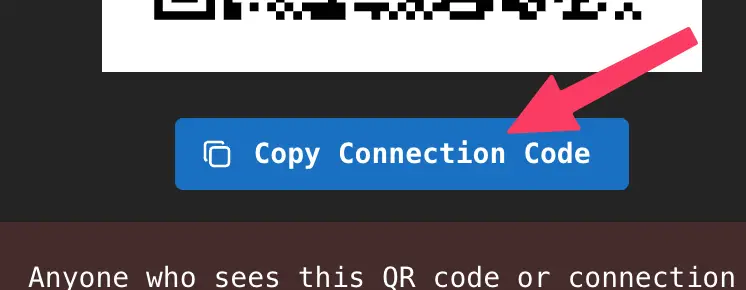
Everything in Part 1, plus pay_invoice. Only for apps you fully trust, and only if they really need to send.
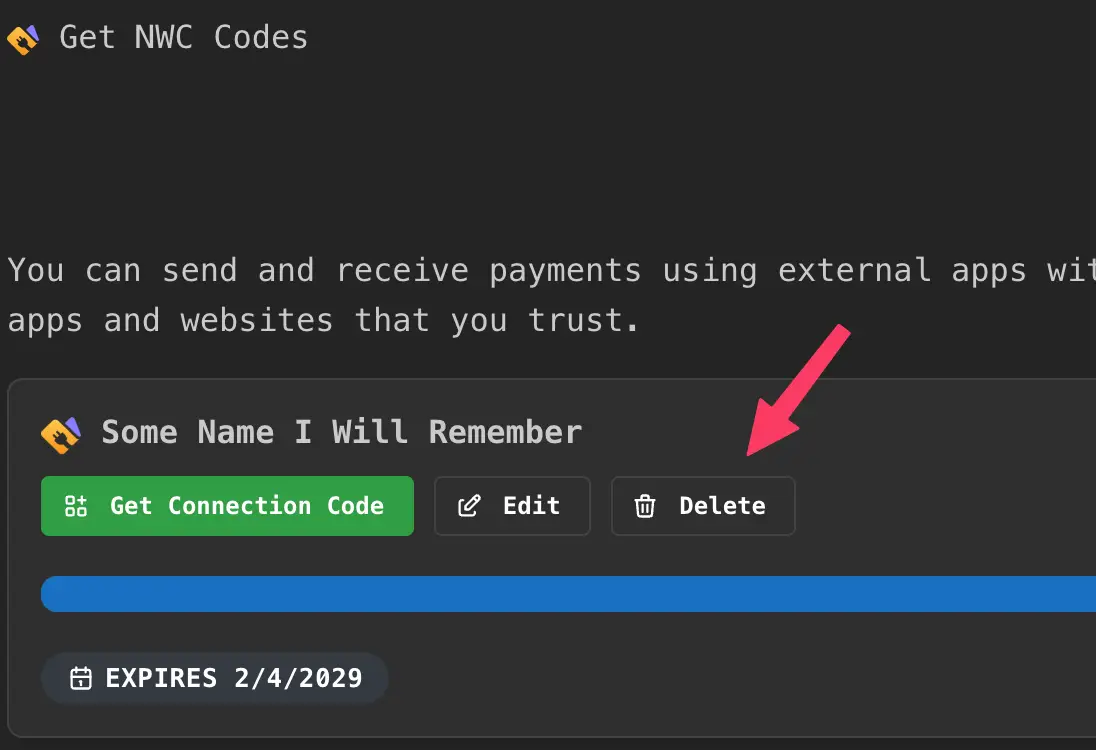
Anyone who has a send & receive code can pay invoices from your vault, up to its budget. Treat it like a password:
- One code per app, with a name you'll recognize.
- Set a budget and an expiry that match what the app needs.
- Never put it in client-side code, a public repo, or a support ticket.
- Delete codes you no longer use.
Get a send & receive code #
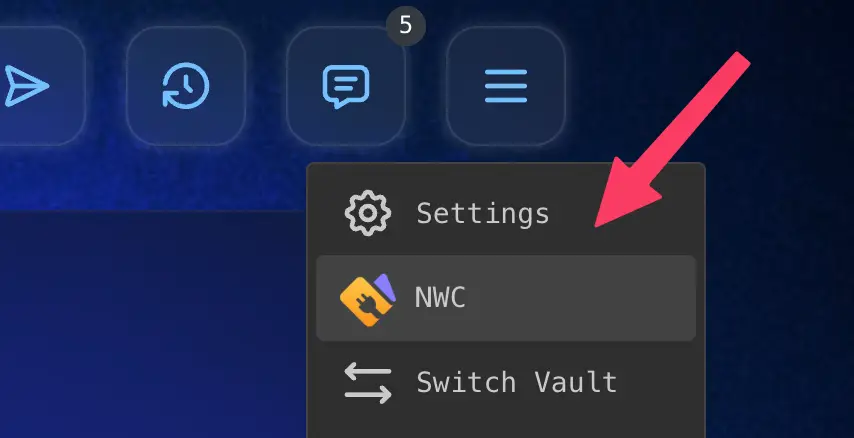
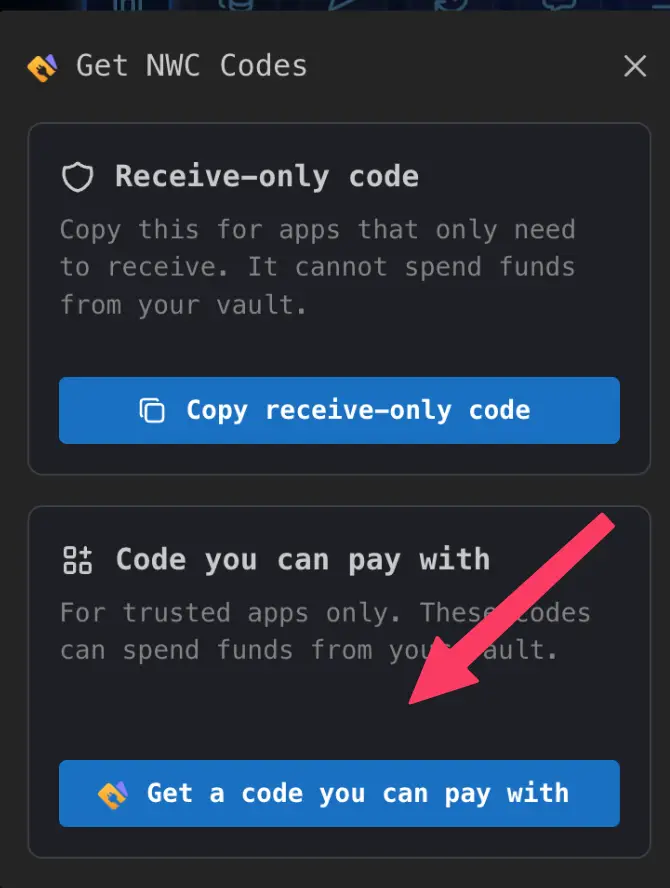
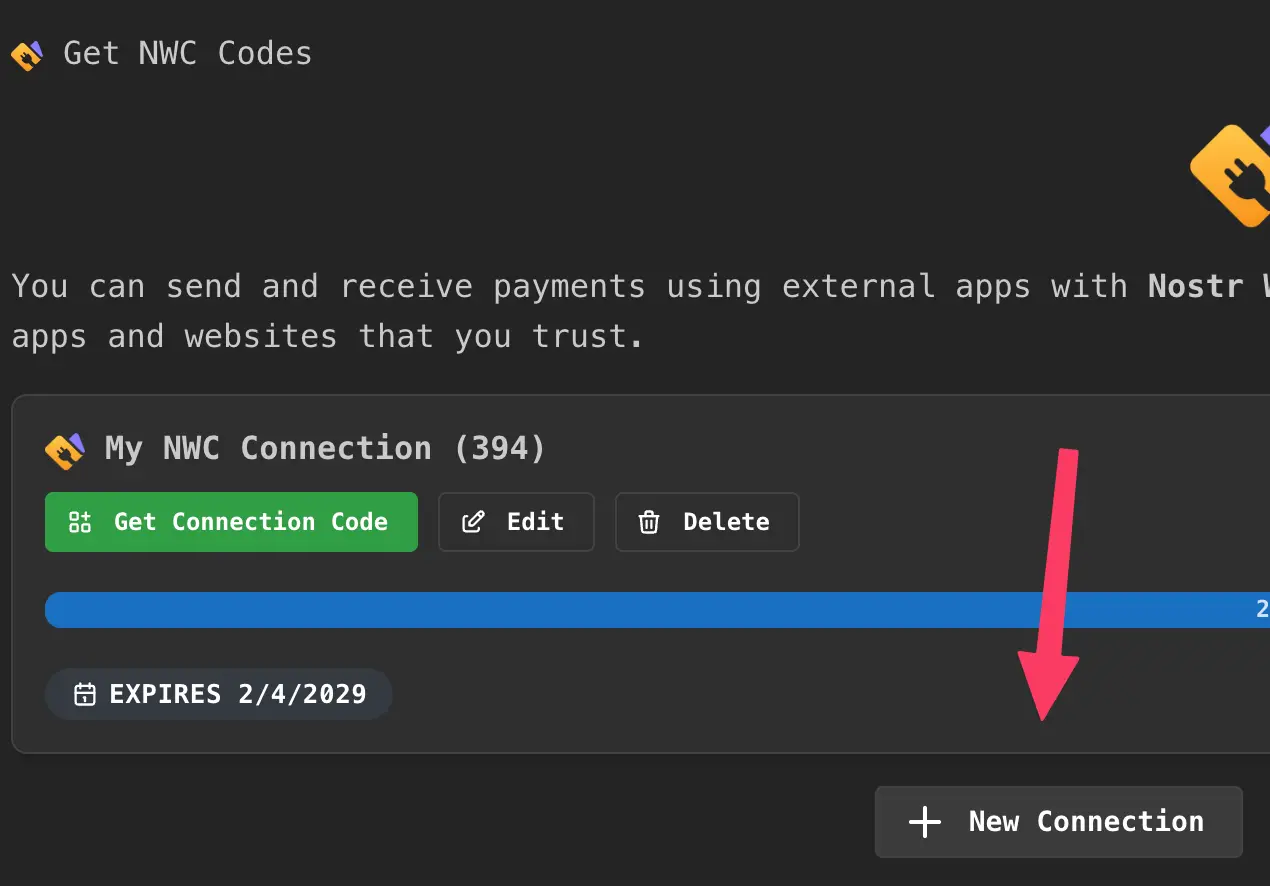
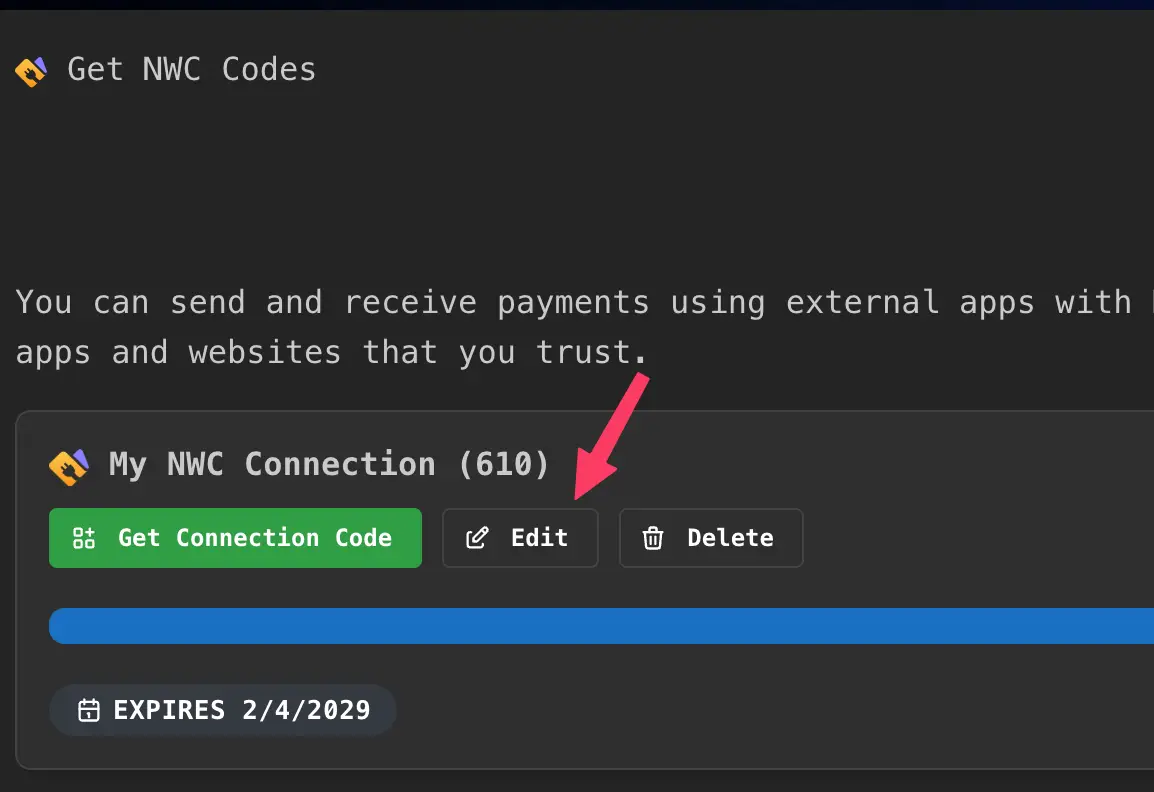
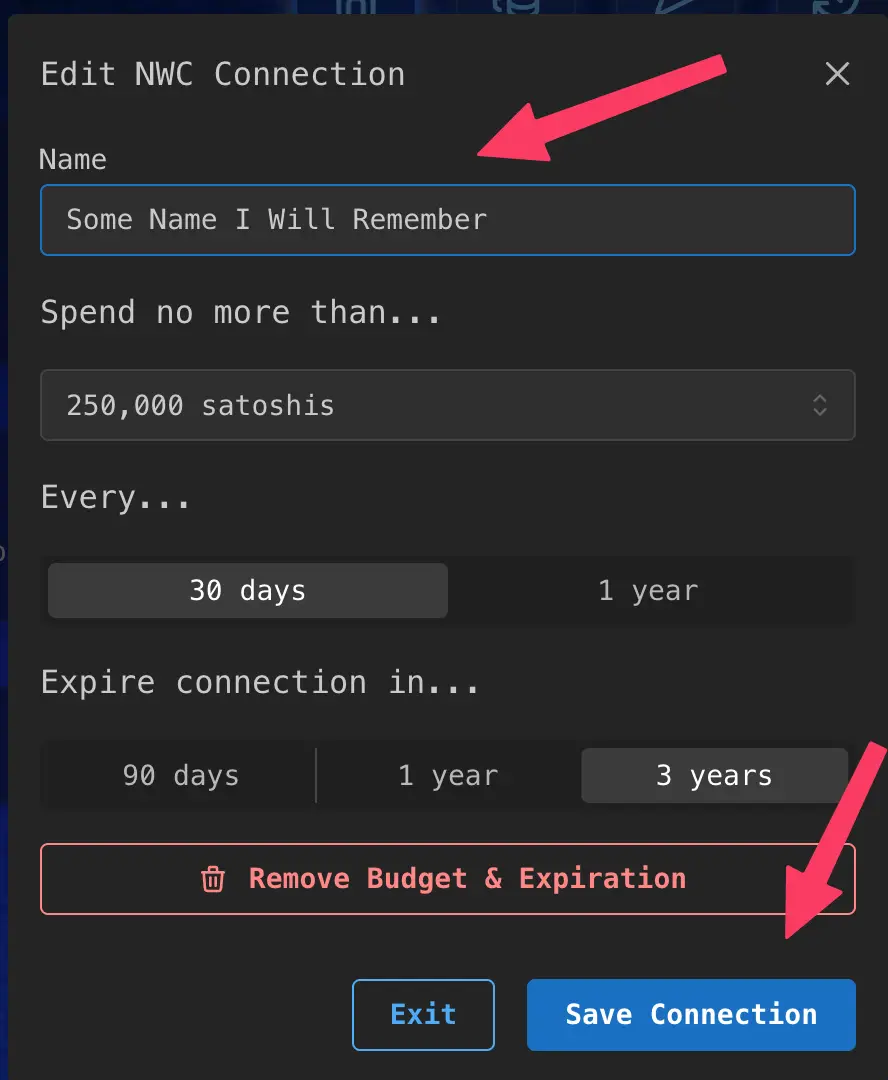
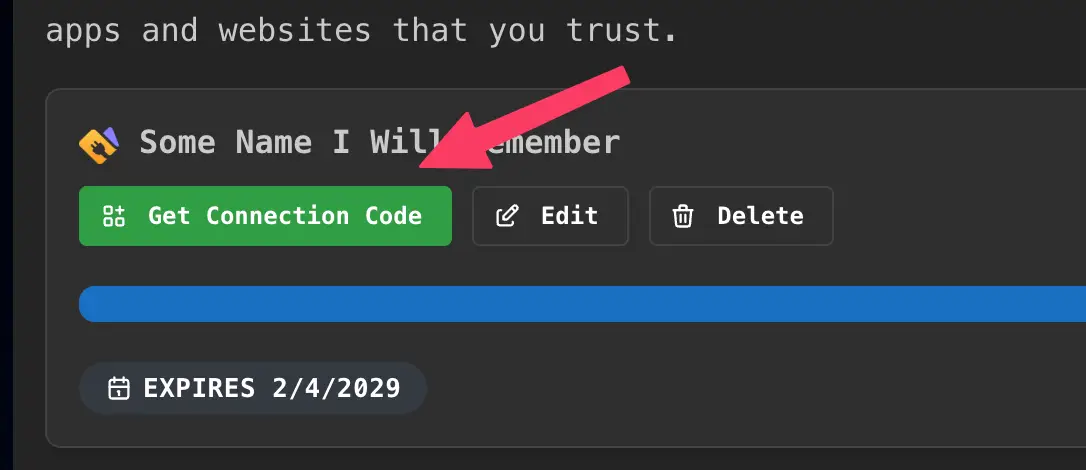
Pays a BOLT11 invoice from the vault. The response arrives when the payment settles or fails, usually within a
second or two. fees_paid is everything you paid on top of the amount (routing plus platform fee), in
millisats; fee and fees carry the same value for older clients.
Parameters
| Name | Type | Description | |
|---|---|---|---|
invoice |
string | Required | A BOLT11 invoice. |
amount |
integer | Optional | Amount in millisats, for an invoice with no amount. It must be whole sats (a multiple of 1000). With an invoice that has an amount, leave it out or send the same amount. |
metadata |
object | Optional | Your own data (e.g. zap details). Stored with the payment and returned by list_transactions when under 4,096 characters of JSON. |
{
  "method": "pay_invoice",
  "params": {
    "invoice": "lnbc25u1p5..."
  }
}{
"result_type": "pay_invoice",
"result": {
"preimage": "836bb72c89952c36c4579e98f3c300d744c54f1a2a8f4a5f7834f9e07792bc68",
"amount": 2500000,
"fees_paid": 3000
},
"error": null
}Alby JS SDK: await client.payInvoice({ invoice })
Errors
| Code | When |
|---|---|
NOT_IMPLEMENTED | You used a receive-only code. That's the point of it. |
INSUFFICIENT_BALANCE | The vault can't cover the amount plus the maximum routing fee and platform fee. |
QUOTA_EXCEEDED | The payment plus fees would go over this code's budget. |
PAYMENT_FAILED | The payment couldn't complete (no route, timeout). Ask the recipient for a new invoice. |
EXPIRED | The invoice has expired, or this code has expired. |
INVALID_INVOICE | The invoice couldn't be parsed. |
OTHER | This invoice has already been paid, This payment is already in progress, Missing invoice, or an amount that doesn't match the invoice or isn't whole sats. |
RATE_LIMITED | Too many requests. Back off for a few seconds, then retry. See Limits. |
Each invoice can be paid once per vault: sending the same invoice again returns an error instead
of paying twice. A pay_invoice request must be signed within the last 10 minutes, and a replayed request
is ignored.
Sent to the code that made the payment once it settles. It uses the encryption of your request: kind
23197 for NIP-44, or 23196 if you sent the request with NIP-04.
{
  "notification_type": "payment_sent",
  "notification": {
    "type": "outgoing",
    "state": "settled",
    "invoice": "lnbc25u1p5...",
    "description": "",
    "description_hash": "",
    "preimage": "836bb72c89952c36c4579e98f3c300d744c54f1a2a8f4a5f7834f9e07792bc68",
    "payment_hash": "e122e43020af76cd1199b0ad122d6fb6d5a0b02f4225df8e86153832efe5ac22",
    "amount": 2500000,
    "fees_paid": 3000,
    "created_at": 1794062945,
    "settled_at": 1794062946,
    "metadata": {}
  }
}
Alby JS SDK: await client.subscribeNotifications(onNotification, ["payment_sent"])
Budgets & fees #
- Budget. Each send & receive code has a spending budget that renews on a schedule (default 250,000 sats every 30 days) and an expiry (default 3 years). Change or remove both in Edit NWC Connection.
- What counts. A payment counts against the budget as amount plus fees. While it's in flight the maximum routing fee is reserved; once it settles, only the fee actually paid counts. Over budget:
QUOTA_EXCEEDED. - Balance. The vault must hold the amount plus the maximum routing fee and platform fee, or you get
INSUFFICIENT_BALANCE. - Fees. Receiving is free. Sending costs a platform fee of 0.1% under normal network conditions (up to 1% when conditions are abnormal), plus Lightning routing fees.
fees_paidreports the total. - Expiry. Requests on an expired code get
EXPIRED. Make a new code.
Taking payments on a website? Use OpenReceive #


OpenReceive is a free, open-source library for accepting Bitcoin on your website or app, straight into your wallet. It's built on exactly the receive-only methods above, so you don't have to write the NWC calls, the polling, or the "was this order already paid?" logic yourself.
- Receive-only by design. It needs only your receive-only code and refuses codes that can spend.
- Polls the right way.
payment_receivednotifications plus one batchedlist_transactionsscan for all open checkouts. - Pays out once. Payments are tracked in your own database, and your
on_paidhook runs once per order. - Prices in your currency. Price orders in dollars, euros and more; it converts to an invoice amount.
- Optional stablecoins. Customers can pay with USDT, USDC, SOL or ETH through a swap provider, and you still receive bitcoin over Lightning.
- Drop-in checkout UI for React, Vue, Svelte, Angular or plain HTML, or build your own.
- Express
- Fastify
- Next.js
- Ruby on Rails
- Django
- FastAPI
- PHP
- Laravel
- WooCommerce
- BTCPay Server
# Node: an HTTP adapter for your framework, plus a checkout UI
npm install @openreceive/express @openreceive/react

# Rails
bundle add openreceive-rails
bin/rails generate openreceive:install

# Either way, the only credential is your receive-only code
NWC_URI="nostr+walletconnect://..."Connection string #
A Rizful code is a standard NIP-47 connection URI:
nostr+walletconnect://bf6eb34f39e40bee2c64cfd14783c08879bfb5e5172f0e20b065c918a0d0ed14?relay=wss%3A%2F%2Frelay-nwc.rizful.com%2Fv1&secret=1a66780b945bde14bb882a2c6ec5437d0cfe2890f94e295183281411a5bfcd40&lud16=you%40rizful.com| Part | Meaning |
|---|---|
nostr+walletconnect:// | The NWC scheme. |
pubkey (after ://) | The wallet service's public key, 32-byte hex. Every code has its own, so codes can be revoked one at a time. Send requests to it in a p tag. |
relay | The relay to connect to: wss://relay-nwc.rizful.com/v1 (URL-encoded in the string). |
secret | Your app's private key, 32-byte hex. Sign and encrypt every request with it. This is the credential. |
lud16 | The vault's Lightning Address. |
Treat the whole string as a secret. Keep it server-side in an environment variable, never in browser code or a repo.
Events & encryption #
Your NWC library handles this for you. It's here for anyone writing a client from scratch.
| Kind | Name | Direction | Notes |
|---|---|---|---|
13194 | Info | Wallet → relay | Lists the code's methods. Tags: ["encryption", "nip44_v2"], ["notifications", "payment_received ..."] and ["extensions", "02 03 05"]. |
23194 | Request | App → wallet | Tags: ["p", <wallet pubkey>], ["encryption", "nip44_v2"], optional ["expiration", <unix time>]. |
23195 | Response | Wallet → app | Tags: ["e", <request id>], ["p", <your pubkey>]. Encrypted with the scheme of the request. |
23197 | Notification | Wallet → app | NIP-44. All notifications. |
23196 | Notification (legacy) | Wallet → app | NIP-04. Only payment_sent for a payment requested with NIP-04. |
Rizful advertises NIP-44 v2 only. Requests encrypted with NIP-04 (or with no encryption tag)
are still accepted and answered in NIP-04 for older clients, but payment_received and
hold_invoice_accepted are only sent with NIP-44. Every current NWC library uses NIP-44.
{
  "method": "make_invoice",
  "params": {
    "amount": 1000000,
    "description": "Order #1234"
  }
}{
"result_type": "make_invoice",
"result": {
"invoice": "lnbc10u1p5...",
"...": "..."
},
"error": null
}{
"result_type": "make_invoice",
"error": {
"code": "RATE_LIMITED",
"message": "Rate limit exceeded"
},
"result": null
}result_type is always the method you called, errors included. On success error is null; on failure result is null and error holds a code and a message. Check error first.
Transaction object #
Returned by make_invoice, lookup_invoice, list_transactions, make_hold_invoice and every notification.
| Field | Type | Description |
|---|---|---|
type | string | incoming (an invoice) or outgoing (a payment). |
state | string | pending, settled, expired (unpaid invoices), failed (payments, canceled hold invoices) or accepted (hold invoice paid, awaiting your decision). |
invoice | string | The BOLT11 invoice. |
description | string | The invoice description, or the payer's comment. |
description_hash | string | Hex description hash, if any. |
preimage | string | Proof of payment, once settled. |
payment_hash | string | Hex payment hash. Use it as your key. |
amount | integer | Millisats. |
fees_paid | integer | Millisats. Always 0 for incoming. |
created_at | integer | Unix time. |
expires_at | integer | Unix time the invoice expires (invoices only). |
settled_at | integer | Unix time it settled, once settled. |
settle_deadline | integer | Hold invoices in accepted state: block height to settle or cancel before. |
metadata | object | Extra data, e.g. a zap request under nostr (NWC-06). |
Fields with no value may be left out, so read them defensively. Hold invoices always include every field.
Error codes #
| Code | Spec | Meaning |
|---|---|---|
RATE_LIMITED | NIP-47 | Too many requests. Back off a few seconds, then retry. |
NOT_IMPLEMENTED | NIP-47 | This code can't use that method (e.g. pay_invoice on a receive-only code), or Rizful doesn't support it. |
INSUFFICIENT_BALANCE | NIP-47 | The vault can't cover the payment plus fees. |
QUOTA_EXCEEDED | NIP-47 | The payment would go over this code's budget. |
PAYMENT_FAILED | NIP-47 | The payment couldn't complete. Ask for a new invoice. |
NOT_FOUND | NIP-47 | No such invoice in this vault. |
UNSUPPORTED_ENCRYPTION | NIP-47 | Use nip44_v2. |
INTERNAL | NIP-47 | A problem on our side. Retry reads. For payments and hold invoices, check the state with lookup_invoice or list_transactions before retrying. |
OTHER | NIP-47 | Anything else; read message. |
EXPIRED | Rizful | This code has expired, or the invoice you tried to pay has. |
INVALID_INVOICE | Rizful | pay_invoice couldn't parse the invoice. |
BAD_REQUEST | Rizful | A hold-invoice parameter is missing or malformed. |
INVALID_REQUEST | Rizful | Malformed request, or outside the allowed time window (see Limits). |
Codes marked Rizful aren't in NIP-47's list. Treat any code you don't recognize like OTHER.
Not supported #
These return NOT_IMPLEMENTED:
pay_keysend(NWC-04),multi_pay_invoice,multi_pay_keysendlookup_payment(NWC-09),make_offer(BOLT12, NWC-12),get_budget(NWC-13),pay/receive(NWC-321)sign_message
Also: lookup_invoice finds incoming invoices only, and the metadata parameter of make_invoice is not stored.
Libraries & tools #
| Alby JS SDK | JavaScript / TypeScript. npm install @getalby/sdk, then NWCClient from @getalby/sdk/nwc. OpenReceive's Node packages use it. |
| nwc-ruby | Ruby. bundle add nwc-ruby. The NWC client OpenReceive's Rails engine uses. |
| nostr-sdk | Python (pip install nostr-sdk), Kotlin and Swift, from Nostr Dev Kit (formerly rust-nostr). Covers requests, including pay_invoice, but not notifications or hold invoices, so watch payments with a batched poll. Still alpha: its API changes between releases. |
| nwc | Rust. cargo add nwc. The same methods as nostr-sdk above, and the same gaps. |
| NNostr.Client | .NET. dotnet add package NNostr.Client, version 0.0.55 or later for NIP-44. The client OpenReceive's BTCPay Server plugin uses. |
| PHP | No standalone NWC library we'd recommend yet. Taking payments? OpenReceive's PHP, Laravel and WordPress packages include their own NWC client. |
| OpenReceive | A complete checkout on top of a receive-only code. Node, Ruby, Python, PHP and .NET. |
| Rizful NWC Tester | Try any NWC code in your browser: get_info, balance, invoices, payments. |
| NWC developer docs | Alby's guides to building with NWC. |
| Alby Hub | Self-hosted NWC wallet. Your Rizful code and an Alby Hub code are interchangeable in your app. |
| NIP-47 and NWC extensions | The specifications this page follows. |
Your language or framework isn't covered? If you want to use NWC and nothing above fits, contact us on Discord, Telegram or at [email protected] so we can help. Writing a client from scratch? Start with Events & encryption.